How to Download Instagram Videos on Android - FastDl
Looking to download Instagram videos on Android? Since the Instagram app doesn't support direct downloads, FastDl.net is the perfect solution for you. This tool allows you to easily save any Instagram photos and videos to your Android device in just a few taps.
FastDl is a versatile Instagram downloader designed to save and download various content, including Videos, Photos, Reels, Stories, Highlights, Audio, and Avatars. Simply paste the link into the input field at FastDl.net, and our system will handle the rest for you.
FastDl.net is a web-based tool that functions perfectly in any browser without needing to install software. It provides full support for all Android devices, allowing you to fetch content quickly and securely through your mobile browser.
Follow the instructions below to download Instagram content to Android without logging in or installing any additional apps.
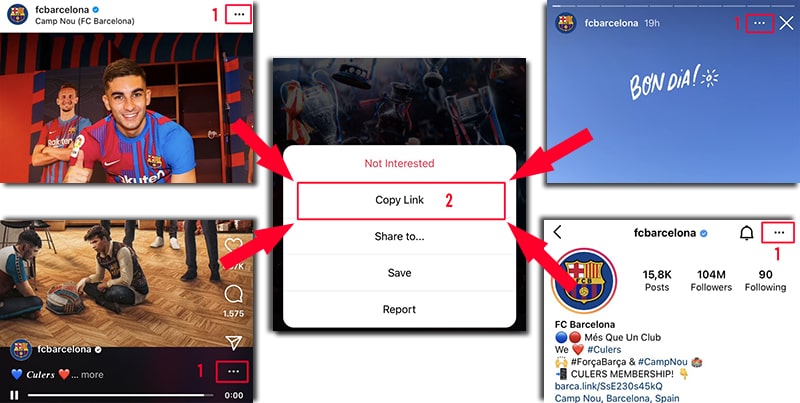
Step 1: Copy the Instagram URL
- Launch the Instagram app on your Android smartphone.
- Navigate to the post you want to save (Video, Photo, Reel, or Story).
- Tap the Share icon and select "Copy Link" to copy the URL to your clipboard.
Step 2: Paste the URL into FastDl
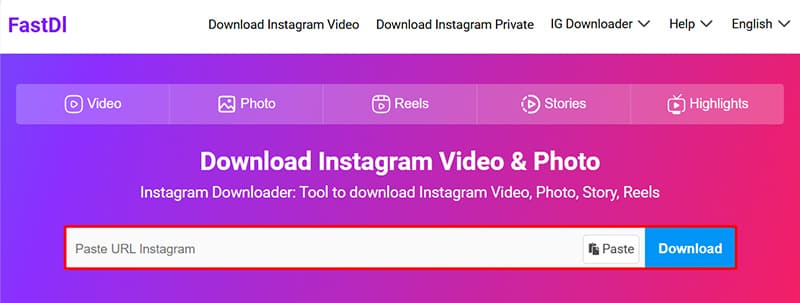
- Open your browser and visit the FastDl.net website.
- Paste the Instagram link you copied into the input field on FastDl and tap the "Download" button.
Step 3: Save files to your device
Wait a few seconds for FastDl to extract the content. Once displayed, you can save the photo or video directly to your Android device.
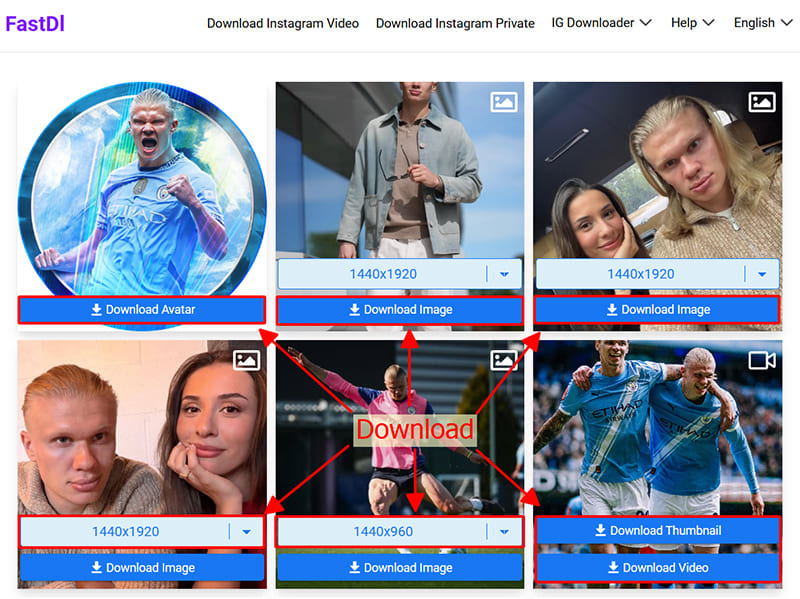
Once the download is complete, you can find your files in the browser's "Downloads" folder or directly in your phone's Gallery or Files app.