How to Download Instagram Videos and Photos with FastDl
Looking for a way to save high-quality videos and photos from Instagram? FastDl is the perfect solution, allowing you to easily download any Instagram content to your phone or computer in just a few simple steps, entirely online.
FastDl.net is the leading Instagram downloader, providing a comprehensive solution to save Videos, Photos, Stories, Reels, Highlights, Audio, and Avatars to your device in the highest original quality.
FastDl is designed to work directly on your web browser without requiring software installation or account login. Simply paste the Instagram link into our input field, and we will process the download for you instantly.
Follow the step-by-step instructions below to download Instagram photos and videos online without any software installation.
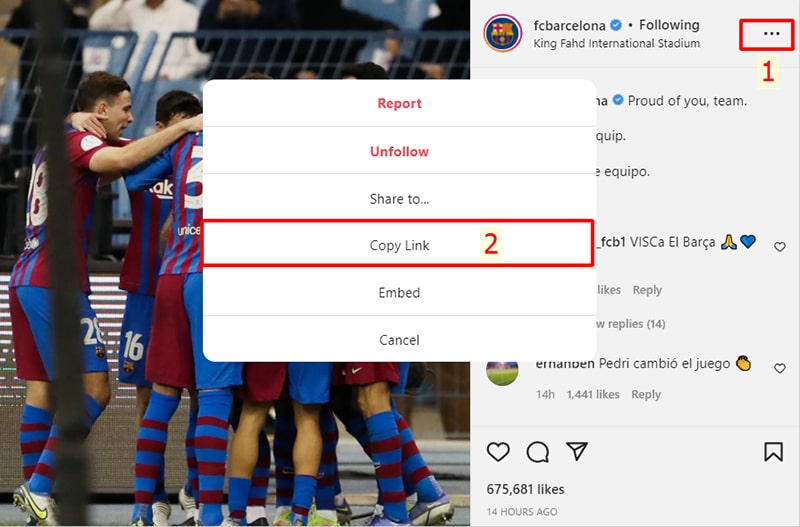
Step 1: Copy the Instagram URL
Find the content (video, photo, or Reel) you want to download, tap the three-dot icon (●●●) and select Copy link.
Step 2: Paste the URL into FastDl
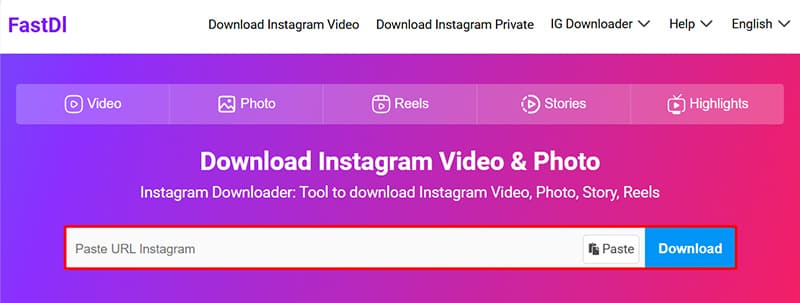
Open your device's web browser and go to the website: FastDl.net
Paste the copied Instagram link into the input box and click the Download button.
Step 3: Save files to your device
Wait a few seconds for our server to process, then your photo or video will appear. You can now save it to your device and enjoy your content.
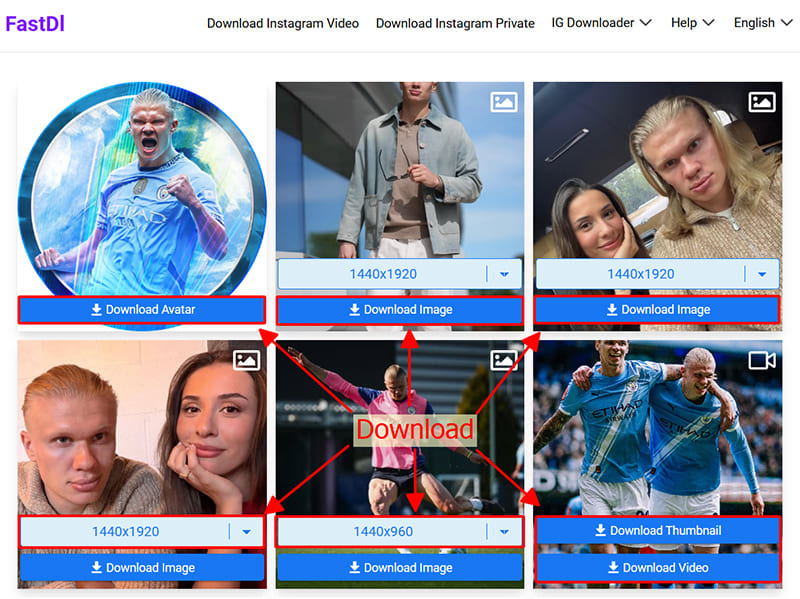
FastDl automatically selects and downloads the best available quality for your videos and photos. However, the final output depends on the original quality of the content when it was initially posted.